
27/1/2026
Making product decisions with incomplete data? Server-side tracking can fix that
Disclaimer
Traditional tracking misses up to 46% of data due to ad blockers and privacy rules, leading to flawed product decisions.
Server-side tracking bypasses restrictions to provide accurate data on feature adoption, retention, and A/B test results.
Moving tracking to the server improves page load speeds and gives you full control over data ownership and security.
Using first-party cookies ensures your analytics and prioritization frameworks are based on actual behavior, not fragmented signals.
While it requires more technical expertise and budget than client-side methods, it is essential for scaling data-reliant products.

Imagine building a feature based on user behavior data, only to discover later that you were missing nearly half of the actual usage patterns.
You thought users weren't engaging with a specific flow, so you removed it - but in reality, 40% of your users were actively using it. You just couldn't see them.
This isn't a hypothetical scenario. According to Google's research, companies implementing server-side tracking improved their measurement effectiveness by 46%.
That's not a small margin of error, that's the difference between making informed product decisions and flying blind.
In this article, we'll show you why traditional tracking fails product teams and how server-side tracking changes the game.
Why traditional tracking fails for product teams
Over 900 million people worldwide use ad blockers. Add to that increasingly strict browser privacy rules - Apple's Intelligent Tracking Prevention (ITP), third-party cookie blocking, and Chrome's privacy settings. The result? Your tracking pixels are blocked, and you're losing critical product data.
For product teams, this isn't just about marketing attribution. It's about:
- Understanding which features users actually engage with
- Identifying pain points in user flows
- Making data-driven prioritization decisions
- Validating product hypotheses
Every invisible user session is a blind spot in your product strategy.
Client-side vs server-side tracking: what's the difference?
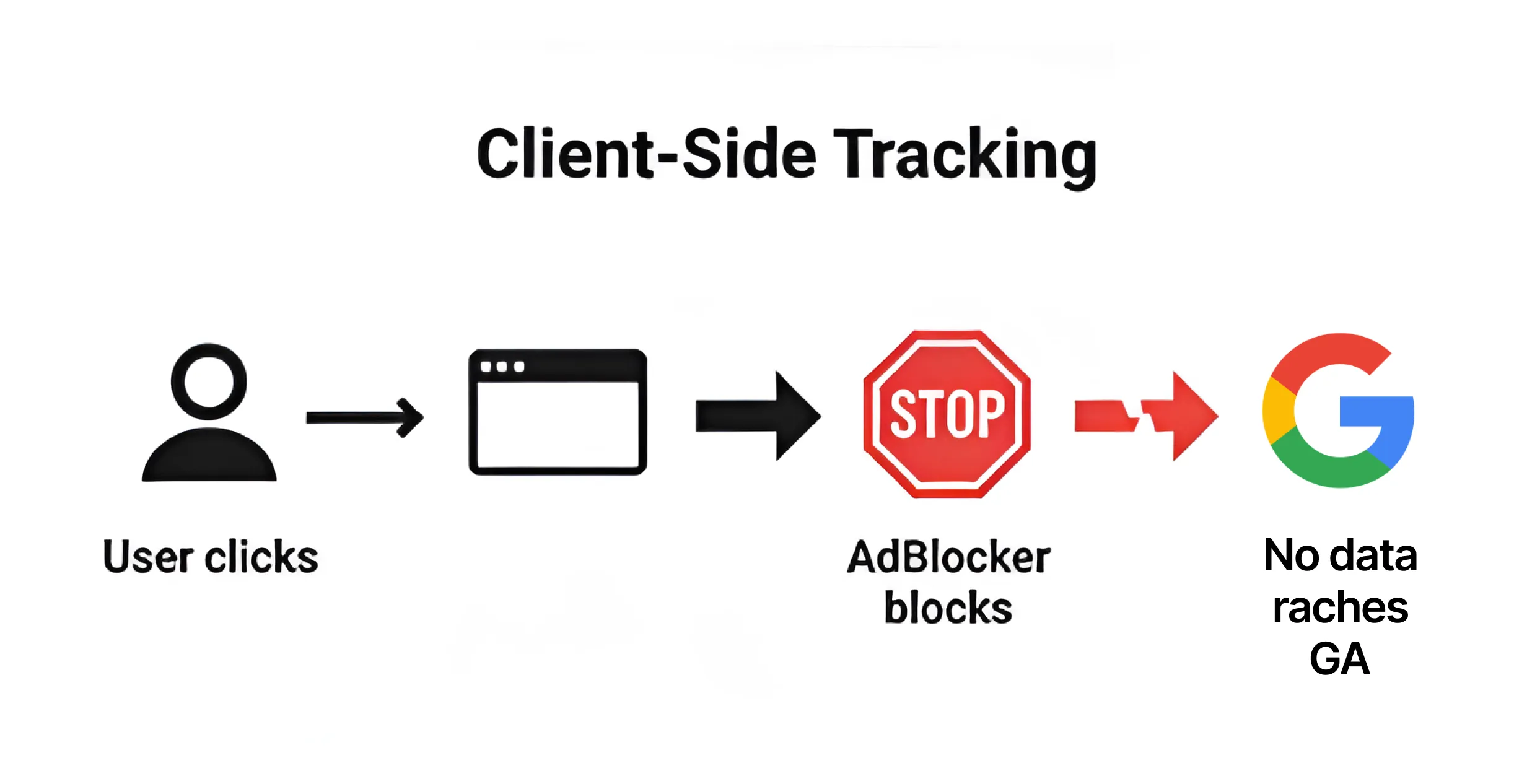
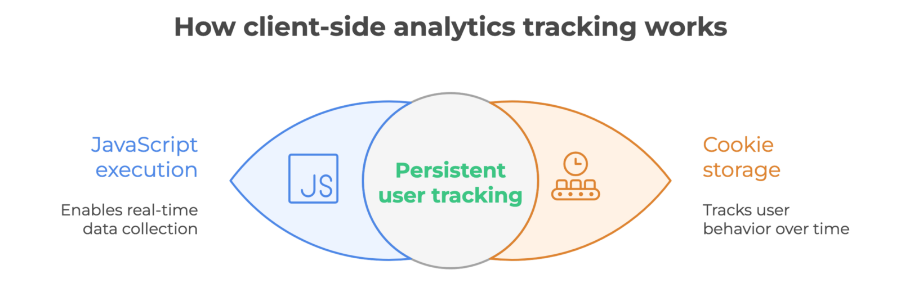
How client-side tracking works
In the traditional model (client-side), everything happens in the user's browser:
- User lands on your product
- Browser executes JavaScript code (e.g., Google Analytics, Mixpanel, Amplitude)
- Script collects data and sends it directly to analytics tools
- Cookies are stored as "third-party" (from external services)
The problem? Each of these steps can be blocked by:
- Ad blockers
- Browser privacy settings
- Third-party cookie restrictions
- VPNs and privacy extensions sd
How server-side tracking works
Server-side tracking changes the rules:
- User lands on your product
- Data is sent to your server (in your domain)
- Server processes, filters, and enriches the data
- Only then does the server send data to analytics tools
- Cookies are treated as "first-party" (from your domain)
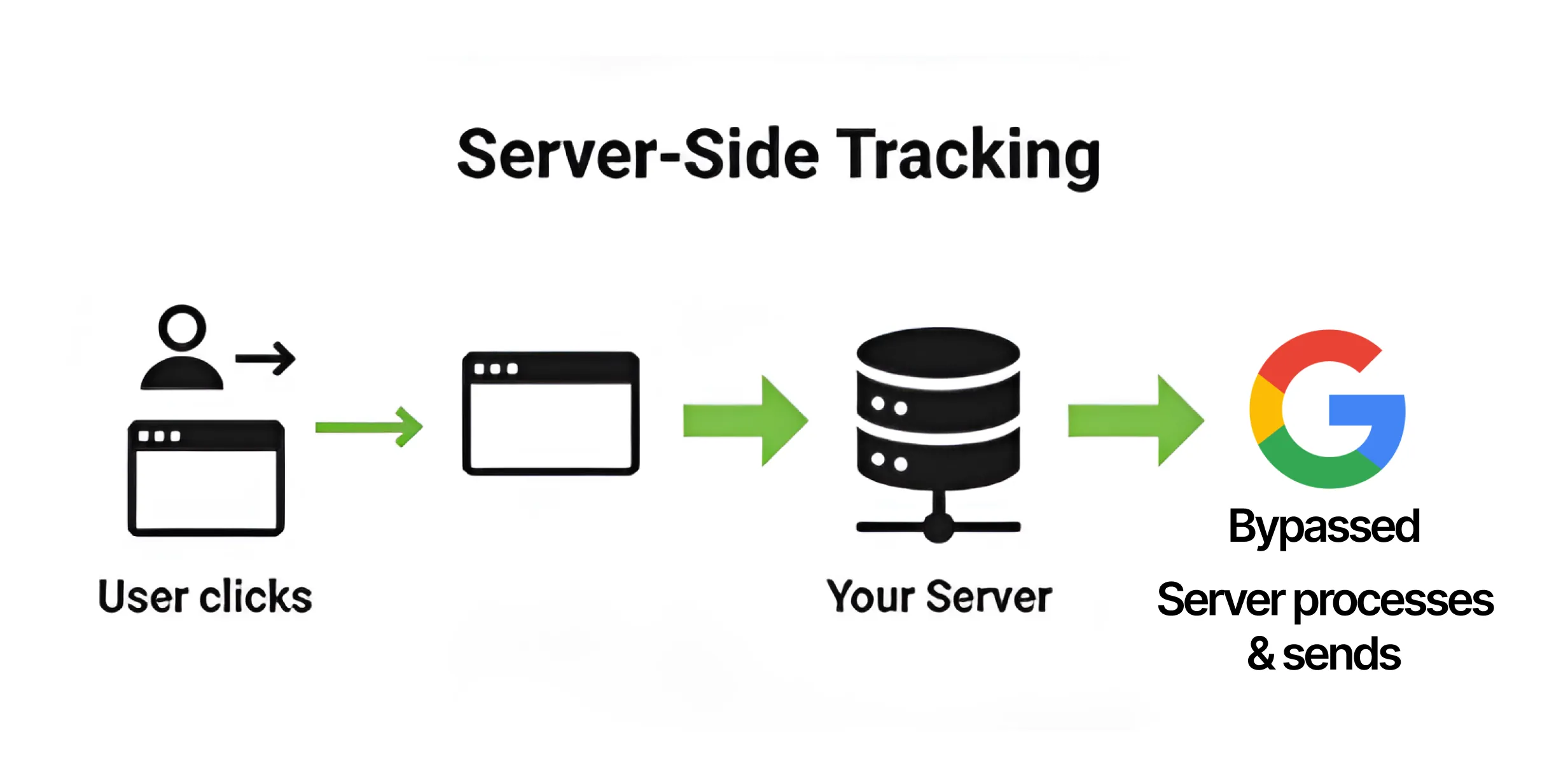
The key difference: the server operates within your domain, so cookies are treated as first-party. Ad blockers and browsers don't block them.
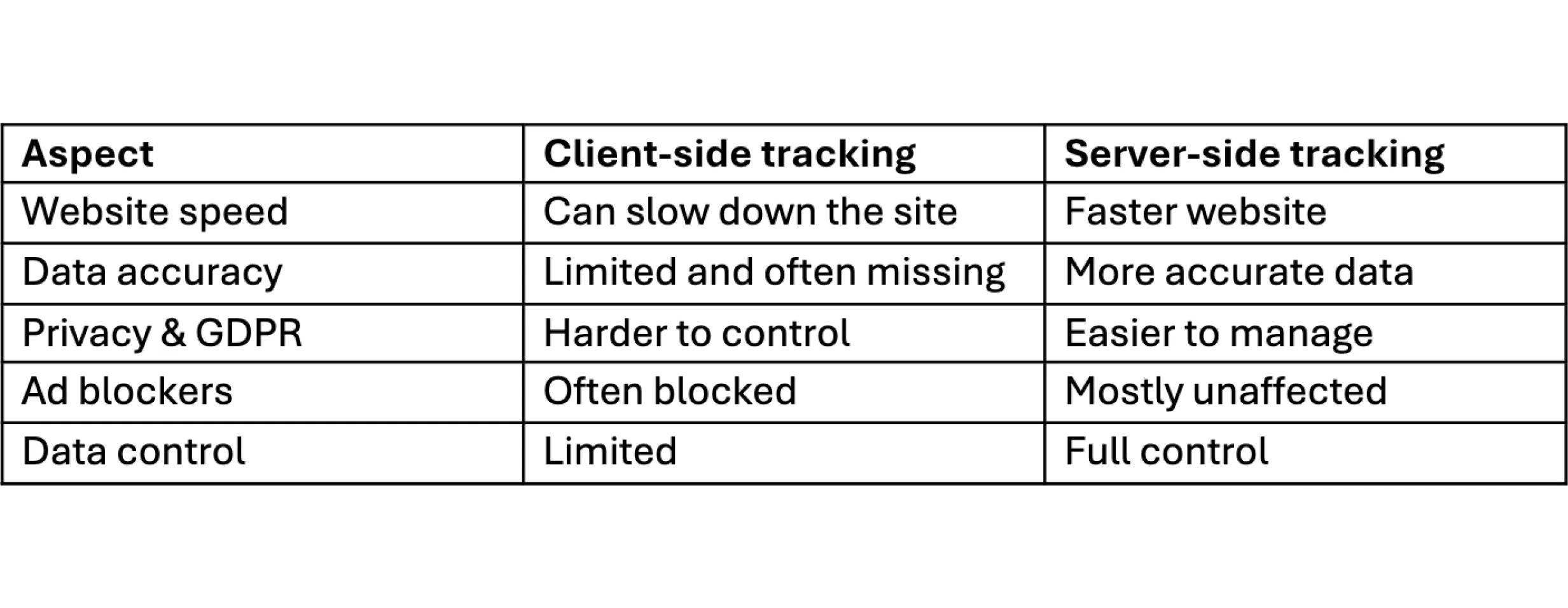
Client-side vs Server-side: comparison
Why server-side tracking matters for product development
1. Complete user journey data
Product decisions should be based on complete data, not fragments. With server-side tracking, you can:
- Track the full user journey from signup to key feature adoption
- Understand actual feature usage patterns (not just visible ones)
- Identify where users drop off in critical flows
- Measure real conversion rates, not partial ones
Example: You're building a SaaS product with a multi-step onboarding flow. Client-side tracking shows 60% completion rate. But 35% of users have ad blockers - so your actual completion rate might be 45%. That's a massive difference in how you approach onboarding optimization.
2. Better feature prioritization
When you're missing data from a significant portion of users, your prioritization framework breaks down. You might:
- Deprioritize features that blocked users actually love
- Over-invest in features that only visible users engage with
- Make incorrect assumptions about user segments
Server-side tracking gives you a more accurate picture of what matters to your entire user base. This becomes especially critical when product teams need to make fast, data-driven decisions about what to build next.
3. Accurate cohort analysis
Product teams rely on cohort analysis to understand retention, activation, and feature adoption over time. But if you're missing 30-40% of users in certain cohorts, your analysis is fundamentally flawed.
With server-side tracking:
- Cohorts reflect actual user behavior across all segments
- Retention metrics are accurate
- You can properly measure the impact of product changes
4. Real A/B testing results
Running an A/B test where variant A has 40% fewer tracked users than variant B because of ad blockers? Your test results are meaningless.
Server-side tracking ensures:
- Both variants have comparable data completeness
- Statistical significance is real, not artifact
- You can confidently ship winning variants
The benefits of server-side tracking
1. Better performance = better product experience
Every script running in the browser slows down your product. For a digital product, performance is part of the user experience. Server-side tracking moves this logic to the server, so:
- Pages load faster
- Users don't wait
- The product feels more responsive
Studies show that every second of delay costs you 7% in conversions. For product teams, that means users bouncing before experiencing your core value prop.
2. Data ownership and control
The server is your territory. You have full control over:
- What data you collect
- How you process it
- Who you send it to
- How long you store it
You can filter sensitive information (e.g., PII, payment details) before it reaches external tools. This isn't just GDPR compliance - it's product responsibility.
3. Higher quality data
The server can:
- Validate data integrity
- Enrich data with additional context (e.g., user tier, subscription status)
- Filter spam and invalid events
- Connect data from multiple sources into a unified view
For product teams, this means cleaner datasets and more reliable insights.
The downsides of server-side tracking
1. Cost
Server-side tracking requires:
- Hosting for the server (Google Tag Manager Server-Side or dedicated platform)
- Technical setup
- Ongoing maintenance
Google Tag Manager Server-Side (sGTM) container is free, but hosting on Google Cloud Platform isn't. Costs start from tens of dollars per month.
2. Technical complexity
This isn't plug-and-play. You need:
- Understanding of tracking architecture
- Server configuration skills
- Knowledge of tags and events
Without the right team, you might spend more time troubleshooting than gaining insights. This is where the question becomes similar to the classic custom software dilemma - sometimes the custom solution gives you more value, but it requires the right resources and commitment.
3. Maintenance overhead
Every tracking change, every new event, every update - everything needs to be implemented server-side too. It's an additional layer that requires attention.
How to implement server-side tracking
Option 1: Self-hosted (Google Tag Manager Server-Side)
Google provides Google Tag Manager Server-Side (sGTM), which you can deploy on Google Cloud Platform:
Pros:
- Free sGTM container
- Full control over configuration
- Integration with Google ecosystem
Cons:
- Requires advanced technical knowledge
- You need to actively manage infrastructure
- GCP hosting is an additional cost
Option 2: Dedicated platforms (e.g., Stape)
Platforms like Stape simplify the process:
Pros:
- Easier setup
- Hosting and infrastructure maintenance handled by platform
- Ready-made solutions for popular tools (Facebook Pixel, GA4, Google Ads)
Cons:
- Higher costs (especially with multiple gateways)
- Less flexibility in customization
- Vendor dependency
Option 3: Ready-made gateways for individual tools
For teams that only need tracking for one channel (e.g., analytics), dedicated solutions exist:
Meta Conversions API Gateway - enables server-side tracking for Facebook without full sGTM setup. Similar solutions exist for GA4, Google Ads, Snapchat, TikTok.
Pros:
- Fastest implementation
- No need to manage full infrastructure
Cons:
- Limited to one tool
- Costs increase if you need more channels
- No customization options
Is server-side tracking right for your product team?
Server-side tracking is the future, but not everyone needs it right now. The decision often comes down to understanding your actual needs versus the complexity of implementation - much like knowing when transparency in IT truly matters.
Definitely worth it if:
- You have significant user traffic (10,000+ monthly active users)
- Product decisions rely heavily on behavioral analytics
- You're processing sensitive data and care about GDPR compliance
- You need accurate cohort and retention analysis
- You're running frequent A/B tests
You can wait if:
- You're in early MVP stage with limited users
- Client-side tracking still gives you sufficient signal
- You don't have technical resources for implementation and maintenance
- Your product doesn't have complex user flows to track
A fun fact to wrap up
In the 1990s and early 2000s, everything was "server-side." Every user click generated a server request that was logged. Analytics worked based on server logs.
Then came the Web 2.0 era, JavaScript started dominating, and we switched to client-side. Now, almost 30 years later, we're going back to the roots. History has come full circle.
But this time, server-side tracking isn't just a return to the past - it's evolution. We're combining the speed and interactivity of modern web with the control and privacy of the server. It's the best of both worlds.
Summary
Server-side tracking is the answer to growing issues with cookie blocking, ad blockers, and privacy regulations. It gives you:
- More complete conversion data (up to 46% better results)
- Faster product performance
- Control over user privacy
- Ability to filter and enrich data
But it also requires investment - both financial and time. It's not a plug-and-play solution, but for product teams that rely on data and want to scale intelligently, it's not the future - it's the present.
Want to stay updated on the latest trends in technology and product development? Subscribe to our newsletter - we deliver valuable content for business owners and product managers every week.
Looking for comprehensive support in analytics and product strategy? Check out Diligently - our brand specializing in marketing strategy and implementing advanced tracking solutions for growing companies.


.svg)
Jan is a Full-stack Developer working with a wide range of technologies. He built solutions across the entire stack - from frontend and backend development to databases, recently focusing on tracking and system integrations.